High Performance HMI for water and wastewater
In short: Shared screen conventions have given the Norwegian water sector a common language, and that is worth keeping. But today we know much more about how operators read screens than when the current standard was made. High Performance HMI is about one thing: normal operation should be calm, and deviations should stand out.
A common language – from another time
The HMI standard developed under Norvar, today Norsk Vann, has done a lot of good. An operator can recognise the screens from one municipality to the next, and suppliers share a common starting point. That is a real advantage in a sector with on-call duty, temporary staff and many small plants.
Still, the standard was made before smartphones, tablets and browser-based SCADA became common, and before the process industry's lessons on operator error and alarm floods were collected in dedicated standards. When we suggest changes to customers, we often hear "this is how it should be, it's in the standard". That is a fair answer. But it is worth asking whether the standard still helps the operator as well as it could.
What is High Performance HMI?
High Performance HMI is a set of design principles developed after serious incidents in the process industry, where operators could not find the important information in a sea of colours and numbers. The principles are described in the international standard ISA-101 for human-machine interfaces in process automation.
- Grey tones as the baseline. Normal operation is shown muted. Colour is used sparingly, almost only for deviations and alarms.
- Colour has one meaning. Red means a high-priority alarm – not "pump running" on one screen and "fault" on another.
- Numbers with context. A level of 1.72 m says little on its own. A small indicator showing the normal range tells you at once whether the value is fine.
- Trends where they matter. Whether a level is rising or falling is often more important than its value right now.
- A hierarchy of displays. From an overview of the whole system, via area and station, down to the details of one pump. The operator starts wide and goes deeper only when something calls for it.
- Alarms that deserve attention. Every alarm should require an action, and priorities should be consistent. This ties closely to good alarm management according to ISA-18.2 and EEMUA 191.
Three o'clock at night
The person on call often sees the screen on a phone, half awake. They should not have to interpret a picture where every pump glows green and every valve has its own colour. The screen should answer three questions as fast as possible: Is everything normal? What is deviating? What do I need to do?
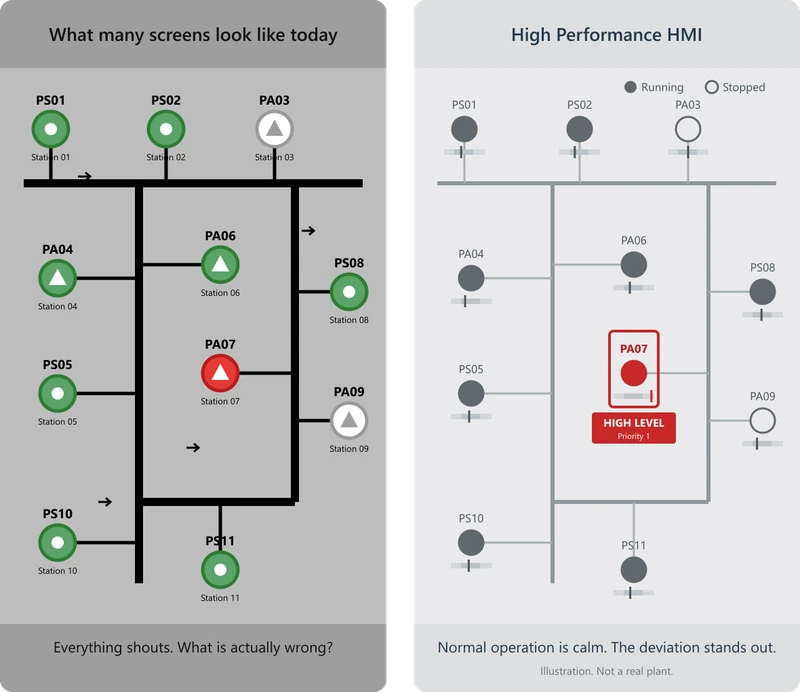
On a traditional screen, the operator has to search for what is wrong. On a High Performance screen, the only thing with colour is what is wrong.
How do we show that a pump is running?
In many plants, green means the pump is running. In High Performance HMI, the operating state is shown without signal colour: a filled, dark symbol means the pump is running, and an outlined symbol means it is stopped. Next to it, the speed or frequency is often shown, for example 42 Hz. The operator sees both that the pump is running and how hard it is working.
Animation, such as spinning impellers or flowing pipes, is not used for normal operation. Movement draws the eye, and that attention should be reserved for what requires action, typically a new, unacknowledged alarm. OpenBridge does the same: pumps and motors have separate symbols for on and off, show speed when running and a state label when stopped, without animation. Flow direction is shown with fixed arrows on the pipes.
This requires the running state to come from real feedback, for example from a contactor or variable frequency drive, and not just from the start command.
Seafarers got it first
In the maritime sector, OpenBridge, developed in Norway, has given the industry an open design system for ship bridges that gathers many suppliers around shared principles: calm screens, consistent use of colour and adaptation to day and night. It shows that a common language and modern design are not in conflict. It should be possible on land too.
How to get started – without throwing everything away
The answer is not to tear everything down and start over. Operators know today's screens, and that knowledge is valuable. We recommend a gradual path:
- Keep what works. Topology, naming and symbol shapes can often stay. The use of colour and the amount of information give the biggest gains.
- Start with one station type. Make a new screen for, say, a standard pumping station, and test it with the operators.
- Clean up the alarms at the same time. A calm screen helps little if the alarm list is still full.
- Use templates. In modern SCADA platforms like Ignition, stations are built from shared templates. An improvement is made once and applies everywhere.
- Think mobile from the start. Many decisions are made on the phone today.
A conversation the sector should have
We do not have all the answers. But we believe it is time for operators, municipalities, consultants and suppliers to talk about what a modern HMI standard for water and wastewater should look like – one that keeps the common language while building on what we have learned since.
Want to see how the principles could look in your plant? We are happy to make an example for one of your stations. Read more about SCADA and about when your SCADA system gets too old.