Redundancy in Ignition: SCADA that tolerates failure
In short: Ignition has built-in support for redundant gateway pairs. But a SCADA server with a backup does not give high availability on its own. The database, network, power and communication out to the plants must be considered as a whole.
Start with the requirement, not the technology
Redundancy costs hardware, licences and complexity. So first ask: what happens if SCADA is gone for five minutes? For an hour? A waterworks where the PLCs control locally tolerates a short interruption in monitoring, but not alarms disappearing. A plant where operators control the process from SCADA has stricter requirements. The answer decides which level of redundancy is right.
Redundant gateway pairs
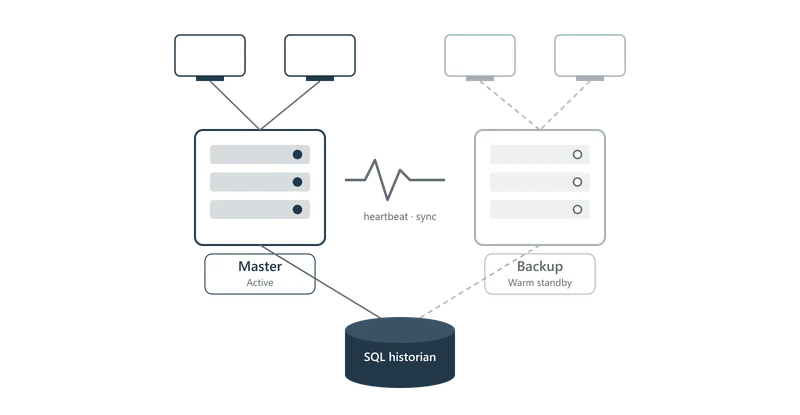
In Ignition, two gateways are set up as master and backup. Configuration and projects are done on the master and synchronised automatically to the backup. The gateways monitor each other, and if the master fails, the backup takes over. Perspective and Vision clients connect automatically to the active gateway.
| Mode | How it works | Suitable when |
|---|---|---|
| Warm standby | The backup keeps its connection to the PLCs and has current values, but does not write history or run gateway scripts until it becomes active. | Fast failover is important |
| Cold standby | The backup is ready, but does not connect to the equipment until it becomes active. | The equipment supports only one connection, or the load is to be kept low |
Be aware of what happens at failover: gateway scripts, transaction groups and alarm notification must tolerate restarting on a different machine. This should be tested, not assumed.
The database is often the weakest link
Ignition stores history, alarm history and the audit log in SQL databases. If the database is down, Ignition's store-and-forward system buffers the data locally until the database is back. This protects against short interruptions, but not against losing the database server.
- For high requirements: a database cluster or replication, for example SQL Server Always On or PostgreSQL with streaming replication.
- Size the store-and-forward buffer according to how long an outage can last.
- Test restoring backups regularly.
Network and power
Two gateways in the same rack, on the same switch and the same circuit give little. Place master and backup physically apart where possible, with a redundant network between them and out to the plants, and a UPS that covers both servers and network equipment.
Out in the field: Edge with a local buffer
In distributed plants, it is more often the connection out to the stations that fails, not the server. With Ignition Edge at the station, collection continues locally, and history is sent on once the connection is back. With MQTT Sparkplug B, the central system also knows exactly which stations are offline, and marks their values as stale.
Checklist
- Define acceptable downtime and data loss before choosing the architecture.
- Use a redundant gateway pair where operators control the process from SCADA.
- Assess the database, network and power as thoroughly as the SCADA server.
- Use Edge with a local buffer at sites with unstable connections.
- Test failover regularly – also after upgrades.
- Monitor that the backup is actually ready, for example with an alarm on redundancy status.
We design and deliver redundant Ignition solutions for plants where uptime is critical. Get in touch if you would like an assessment of your plant.